# Import the Python Libraries

import numpy as np
import pandas as pd
import matplotlib.pyplot as plt


data = pd.read_csv("Real estate.csv")

data.info()

<class 'pandas.core.frame.DataFrame'>
RangeIndex: 414 entries, 0 to 413
Data columns (total 8 columns):
 #   Column                                  Non-Null Count  Dtype
---  ------                                  --------------  -----
 0   No                                      414 non-null    int64
 1   X1 transaction date                     414 non-null    float64
 2   X2 house age                            414 non-null    float64
 3   X3 distance to the nearest MRT station  414 non-null    float64
 4   X4 number of convenience stores         414 non-null    int64
 5   X5 latitude                             414 non-null    float64
 6   X6 longitude                            414 non-null    float64
 7   Y house price of unit area              414 non-null    float64
dtypes: float64(6), int64(2)
memory usage: 26.0 KB

# Viewing the top half of the data

data.head()

No	X1 transaction date	X2 house age	X3 distance to the nearest MRT station	X4 number of convenience stores	X5 latitude	X6 longitude	Y house price of unit area
0	1	2012.917	32.0	84.87882	10	24.98298	121.54024	37.9
1	2	2012.917	19.5	306.59470	9	24.98034	121.53951	42.2
2	3	2013.583	13.3	561.98450	5	24.98746	121.54391	47.3

#3	4	2013.500	13.3	561.98450	5	24.98746	121.54391	54.8
4	5	2012.833	5.0	390.56840	5	24.97937	121.54245	43.1

# Viewing the lower half of the data
data.tail()

No	X1 transaction date	X2 house age	X3 distance to the nearest MRT station	X4 number of convenience stores	X5 latitude	X6 longitude	Y house price of unit area
409	410	2013.000	13.7	4082.01500	0	24.94155	121.50381	15.4
410	411	2012.667	5.6	90.45606	9	24.97433	121.54310	50.0
411	412	2013.250	18.8	390.96960	7	24.97923	121.53986	40.6
412	413	2013.000	8.1	104.81010	5	24.96674	121.54067	52.5
413	414	2013.500	6.5	90.45606	9	24.97433	121.54310	63.9

# To know the relationship/correlation between the dependent variables and the independent variables; this was what led to the exclusion of the transaction date column while building the model.

data.corr()

No	X1 transaction date	X2 house age	X3 distance to the nearest MRT station	X4 number of convenience stores	X5 latitude	X6 longitude	Y house price of unit area
No	1.000000	-0.048658	-0.032808	-0.013573	-0.012699	-0.010110	-0.011059	-0.028587
X1 transaction date	-0.048658	1.000000	0.017549	0.060880	0.009635	0.035058	-0.041082	0.087491
X2 house age	-0.032808	0.017549	1.000000	0.025622	0.049593	0.054420	-0.048520	-0.210567
X3 distance to the nearest MRT station	-0.013573	0.060880	0.025622	1.000000	-0.602519	-0.591067	-0.806317	-0.673613
X4 number of convenience stores	-0.012699	0.009635	0.049593	-0.602519	1.000000	0.444143	0.449099	0.571005
X5 latitude	-0.010110	0.035058	0.054420	-0.591067	0.444143	1.000000	0.412924	0.546307
X6 longitude	-0.011059	-0.041082	-0.048520	-0.806317	0.449099	0.412924	1.000000	0.523287
Y house price of unit area	-0.028587	0.087491	-0.210567	-0.673613	0.571005	0.546307	0.523287	1.000000

X = data.iloc[:, 2:-1].values
y = data.iloc[:, -1].values


print(X)

[[ 32.       84.87882  10.       24.98298 121.54024]
 [ 19.5     306.5947    9.       24.98034 121.53951]
 [ 13.3     561.9845    5.       24.98746 121.54391]
 ...
 [ 18.8     390.9696    7.       24.97923 121.53986]
 [  8.1     104.8101    5.       24.96674 121.54067]
 [  6.5      90.45606   9.       24.97433 121.5431 ]]

print(y)

[ 37.9  42.2  47.3  54.8  43.1  32.1  40.3  46.7  18.8  22.1  41.4  58.1
  39.3  23.8  34.3  50.5  70.1  37.4  42.3  47.7  29.3  51.6  24.6  47.9
  38.8  27.   56.2  33.6  47.   57.1  22.1  25.   34.2  49.3  55.1  27.3
  22.9  25.3  47.7  46.2  15.9  18.2  34.7  34.1  53.9  38.3  42.   61.5
  13.4  13.2  44.2  20.7  27.   38.9  51.7  13.7  41.9  53.5  22.6  42.4
  21.3  63.2  27.7  55.   25.3  44.3  50.7  56.8  36.2  42.   59.   40.8
  36.3  20.   54.4  29.5  36.8  25.6  29.8  26.5  40.3  36.8  48.1  17.7
  43.7  50.8  27.   18.3  48.   25.3  45.4  43.2  21.8  16.1  41.   51.8
  59.5  34.6  51.   62.2  38.2  32.9  54.4  45.7  30.5  71.   47.1  26.6
  34.1  28.4  51.6  39.4  23.1   7.6  53.3  46.4  12.2  13.   30.6  59.6
  31.3  48.   32.5  45.5  57.4  48.6  62.9  55.   60.7  41.   37.5  30.7
  37.5  39.5  42.2  20.8  46.8  47.4  43.5  42.5  51.4  28.9  37.5  40.1
  28.4  45.5  52.2  43.2  45.1  39.7  48.5  44.7  28.9  40.9  20.7  15.6
  18.3  35.6  39.4  37.4  57.8  39.6  11.6  55.5  55.2  30.6  73.6  43.4
  37.4  23.5  14.4  58.8  58.1  35.1  45.2  36.5  19.2  42.   36.7  42.6
  15.5  55.9  23.6  18.8  21.8  21.5  25.7  22.   44.3  20.5  42.3  37.8
  42.7  49.3  29.3  34.6  36.6  48.2  39.1  31.6  25.5  45.9  31.5  46.1
  26.6  21.4  44.   34.2  26.2  40.9  52.2  43.5  31.1  58.   20.9  48.1
  39.7  40.8  43.8  40.2  78.3  38.5  48.5  42.3  46.   49.   12.8  40.2
  46.6  19.   33.4  14.7  17.4  32.4  23.9  39.3  61.9  39.   40.6  29.7
  28.8  41.4  33.4  48.2  21.7  40.8  40.6  23.1  22.3  15.   30.   13.8
  52.7  25.9  51.8  17.4  26.5  43.9  63.3  28.8  30.7  24.4  53.   31.7
  40.6  38.1  23.7  41.1  40.1  23.  117.5  26.5  40.5  29.3  41.   49.7
  34.   27.7  44.   31.1  45.4  44.8  25.6  23.5  34.4  55.3  56.3  32.9
  51.   44.5  37.   54.4  24.5  42.5  38.1  21.8  34.1  28.5  16.7  46.1
  36.9  35.7  23.2  38.4  29.4  55.   50.2  24.7  53.   19.1  24.7  42.2
  78.   42.8  41.6  27.3  42.   37.5  49.8  26.9  18.6  37.7  33.1  42.5
  31.3  38.1  62.1  36.7  23.6  19.2  12.8  15.6  39.6  38.4  22.8  36.5
  35.6  30.9  36.3  50.4  42.9  37.   53.5  46.6  41.2  37.9  30.8  11.2
  53.7  47.   42.3  28.6  25.7  31.3  30.1  60.7  45.3  44.9  45.1  24.7
  47.1  63.3  40.   48.   33.1  29.5  24.8  20.9  43.1  22.8  42.1  51.7
  41.5  52.2  49.5  23.8  30.5  56.8  37.4  69.7  53.3  47.3  29.3  40.3
  12.9  46.6  55.3  25.6  27.3  67.7  38.6  31.3  35.3  40.3  24.7  42.5
  31.9  32.2  23.   37.3  35.5  27.7  28.5  39.7  41.2  37.2  40.5  22.3
  28.1  15.4  50.   40.6  52.5  63.9]

# Dividing the data into the train and test set

from sklearn.model_selection import train_test_split
X_train, X_test, y_train, y_test = train_test_split(X, y, test_size=0.25, random_state=1)


print(X_train[:, 0])

[18.2 13.6  3.8  4.  41.3  3.4 35.4  6.2 33.2 10.8 20.9 13.2 14.1 13.2
 10.4 23.  28.6 13.8 12.8 13.2 35.3 27.5 17.7 16.4 12.5 37.3  9.1  3.6
 17.2  3.7  1.1 13.3 13.3 13.   3.5  6.5 33.5 25.6 30.  31.7  4.1  3.8
  8.9  4.   9.9  0.  13.2  4.3  0.  10.  33.3 31.3  9.9 17.9 17.   0.
 34.4 32.   0.  16.1 32.4  4.1  6.6  3.1 35.8 34.5  8.5 28.2 16.4 11.5
  6.2  2.1 13.1 36.1  3.5  4.1 31.   3.6 30.6  1.9 19.2 33.5 12.5 10.3
  3.2 26.8 17.5 15.4 34.8  8.1 30.2 13.3 18.9 16.2 16.9  1.5 19.8 11.6
 15.   2.7 12.2 18.8 12.4 31.4  1.1  8.4 18.  42.7 32.6 15.1 31.7  1.1
  6.4 41.4  5.7  7.8 19.2 29.6 14.4 31.7 16.4 37.9 30.1 24.2 34.6 34.7
 12.6 16.5  9.  21.2 13.9 15.6  2.6 16.1 41.3 21.7 39.2  1.  37.7  7.8
 18.   8.  18.5 16.4 17.1 36.6 22.2 27.6  3.9 35.9 14.8 33.  29.3 29.1
 10.5 19.  18.2 13.6 39.6 14.1 12.8 33.4 30.9 17.6 21.7 10.3  1.5 16.2

 28.  33.6 15.9 16.2 38.3 11.6 28.4 30.6  0.  25.3  0.  24.   5.6 16.1
 13.9 15.2 34.  13.5 33.6  0.  37.2 29.6 30.3 11.  40.9  9.7 16.2 16.4
 38.3 12.   1.7 34.8 17.6  6.4  5.2 11.   3.5 38.   7.1 14.7 33.9  4.5
 14.2 12.3 17.4 20.5  3.9  5.2 34.9 17.3 13.3 32.1 15.9 30.4 17.7 16.9
 17.   4.9 14.7 16.5 35.3  6.8 32.8 12.7 16.9 18.1 13.6 17.4 17.8 16.6
 11.4  0.  25.3 20.2 13.8  2.6 38.6 15.2 15.7 16.3 32.7  6.5  2.  16.5
 29.3 22.8 17.5 35.7 34.9  4.   5.1 16.4  3.1 35.9 34.4  2.3 13.3  8.
 29.4 12.7 25.9 13.6 20.6  0.  37.8 32.6 34.8 13.3 19.5  8.3 14.7 15.6
 34.6 20.3  5.1  1.8 18.4 13.7 19.2 30.4 21.7 30.7  5.9  0.   1.1 19.1
 13.1  4.7 32.8 13.  35.5 38.5 11.9 27.3 18.  15.6 16.9 31.5 32.5 37.1
 12.9 12. ]

# Building the model

from sklearn.linear_model import LinearRegression
regressor = LinearRegression()
regressor.fit(X_train, y_train)

LinearRegression()

y_pred = regressor.predict(X_test)

print(f"Price = {round(regressor.intercept_, 2)} + {round(regressor.coef_[0], 2)}house age + {round(regressor.coef_[1], 4)}mri station + {round(regressor.coef_[2], 2)}convenience store + {round(regressor.coef_[3], 2)}latitude + {round(regressor.coef_[4], 2)}longitude" )

# The Multiple Linear Regression Model

Price = -433.79 + -0.24house age + -0.0047mri station + 1.09convenience store + 224.0latitude + -42.1longitude

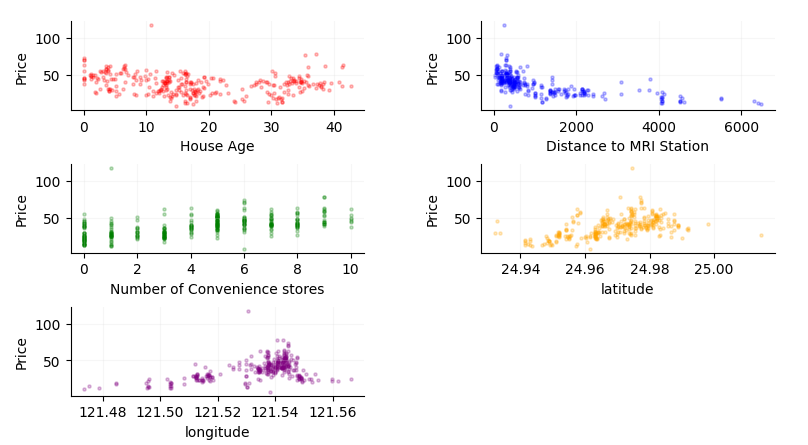
# Code for visualizing the data - mostly the relationships between the independent variables and the dependent variable.

plt.suptitle("Model Showing the factors that affect Real Estate Price")

plt.subplot(3,2,1)
plt.scatter(X_train[:, 0], y_train, color="r", s=5, alpha=0.5)
plt.xlabel("House Age")
plt.ylabel("Price")

plt.subplot(3,2,2)
plt.scatter(X_train[:, 1], y_train, color="b", s=5, alpha=0.5)
plt.xlabel("Distance to MRI Station")
plt.ylabel("Price")

plt.subplot(3,2,3)
plt.scatter(X_train[:, 2], y_train, color="g", s=5, alpha=0.5)
plt.xlabel("Number of Convenience stores")
plt.ylabel("Price")

plt.subplot(3,2,4)
plt.scatter(X_train[:, 3], y_train, color="orange", s=5, alpha=0.5)
plt.xlabel("latitude")
plt.ylabel("Price")

plt.subplot(3,2,5)
plt.scatter(X_train[:, 4], y_train, color="purple", s=5, alpha=0.5)
plt.xlabel("longitude")
plt.ylabel("Price")

plt.subplots_adjust(left=0.1,
                    bottom=0.1,
                    right=1.2,
                    wspace=0.4,
                    hspace=0.6)

plt.show()